cmux: A Ghostty-Based macOS Terminal for Parallel Agents
Introduction
Running several terminal-based coding agents—or many long-lived shells across worktrees—compresses two pain points into the same UX: finding the right surface among a pile of windows, and telling which session genuinely needs attention instead of burying signals in duplicates of every other tab bar. cmux is a native macOS host for that pattern: workspaces with vertical sidebar tabs, split panes, a pane-level notification system hooked to OSC sequences as well as a CLI hook, GPU-backed terminal rendering via Ghostty’s libghostty, and optionally an embedded browser pane with programmatic control comparable to tooling like agent-browser.
The project pitches itself explicitly as primitives—terminal, browser, notifications, workspaces—not a turnkey “agent orchestrator” UI. Practically that means cmux complements whatever CLIs or agents you already run; whether that tradeoff nets out for you hinges on caring about macOS-native integration versus cross-platform multiplexing conventions you already rebuilt in tmux.
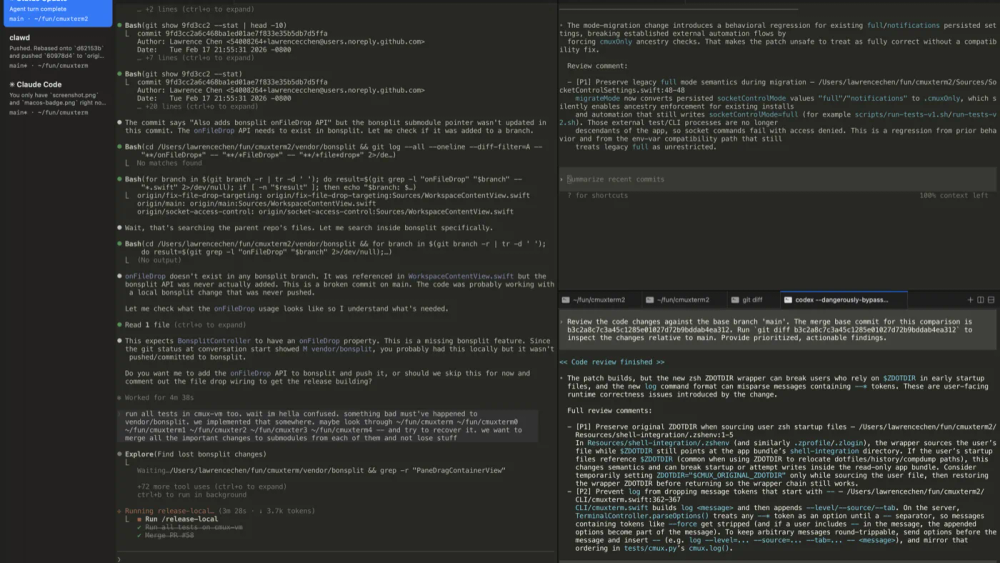
Cover: upstream documentation screenshot for vertical tabs/splits (docs/assets/vertical-horizontal-tabs-and-splits.png in the manaflow-ai/cmux repo, distributed under GPL-3.0-or-later with a parallel commercial license option in LICENSE).
Ghostty renders; cmux composes
cmux is not a fork of the Ghostty app. Ghostty exposes libghostty; cmux embeds it the way browsers embed engines—different product boundaries, shared rendering chops. Upshot for users who already standardized on Ghostty: themes, fonts, and colors carry over from ~/.config/ghostty/config, while window chrome, workspaces, splits, browser, and notification wiring belong to cmux. If someone wanted “Ghostty minus nothing,” they stick with Ghostty; cmux is for people who prioritize labeled workspaces over the stock tab strip.
Automation and SSH-shaped workspaces
A CLI and socket API underpin layout and input (workspaces, splits, keystrokes, browser control)—the natural place for “focus this workspace after CI fails” orchestration layered on Claude Code hooks or bespoke scripts rather than rewriting macOS bridging per tool.
cmux ssh user@remote (flags mirror ordinary ssh, including host aliases from ~/.ssh/config; see cmux.com/docs/ssh) warrants a sharper mental model: it spins up a workspace where embedded browser traffic is proxied through the remote host—localhost: on that pane resolves on the remote box without manual -L forwarding, with a per-connection isolated cookie jar. Dragging files into the remote terminal uploads over scp on the existing channel (upstream describes ControlMaster reuse and matching the foreground SSH session by TTY). Agents on the far side can run cmux notify such that cmux on your Mac shows rings and unread state; flaky links get per-host notification cooldown. On drops, cmux reconnects with exponential backoff and injects keepalives (ServerAliveInterval / ServerAliveCountMax) unless your SSH config already sets them. Compare that to multiplexing localhost-only shells: different plumbing, overlapping surface area.
How this differs from tmux (and restore caveats)
tmux lives inside a terminal emulator; survives SSH drops; restores layout purely on the POSIX side independent of Cocoa. cmux trades that universality for a hosted macOS experience—GUI affordances around attention, sidebar metadata, baked-in browser—not a substitution for unattended server sessions detached from graphical life.
The README’s session-restore section is explicit where persistence stops: relaunch restores window/workspace/pane layout, working directories, browser URL + navigation history, terminal scrollback (best-effort), and saved Claude Code / Codex sessions when cmux still holds a resume token—not arbitrary live Vim/tmux transcripts. Treat online “getting started” blurbs as secondary if they lag that nuance.
Install, licensing, platform
Availability is macOS-only today via DMG (Sparkle-backed updates per upstream) or brew tap manaflow-ai/cmux / brew install --cask cmux.
The checked-in LICENSE file dual-licenses the project—GNU GPL v3 or later for the OSS path plus an optional commercial grant contact at [email protected] when GPL obligations are a blocker. Read that file (not third-party summaries) before baking cmux-derived work into redistribution pipelines where copyleft coupling matters.
Canonical detail for versions, deltas, shortcuts, nightly builds: the same cmux repo—this article is explanatory, not a substitute for changelog-level truth.
Conclusion
cmux is worth evaluating when pane-level urgency and repo-scoped tab chrome outweigh staying inside a multiplexed terminal you already scripted to death—or when Electron-forward “agent workspaces” grated on responsiveness but you still want browser-in-the-shell without separate automation plumbing. Fail the filter early if Linux is mandatory, OSC/hook instrumentation is undesirable, tmux-tier SSH persistence is sacred, or GPL friction blocks adoption. Prefer the changelog and bundled docs on GitHub whenever behavior drifts faster than outsider summaries.